Instagram Story Viewer Not Working? 7 Fixes That Actually Help
If an Instagram story viewer not working is blocking you right now, it’s almost always one of a handful of causes — not a broken tool. Our own anonymous Instagram story viewer runs into the same handful of issues, so here are the 7 fixes that resolve it in most cases, in the order to try them.
Instagram story viewer not working: the 4 usual causes
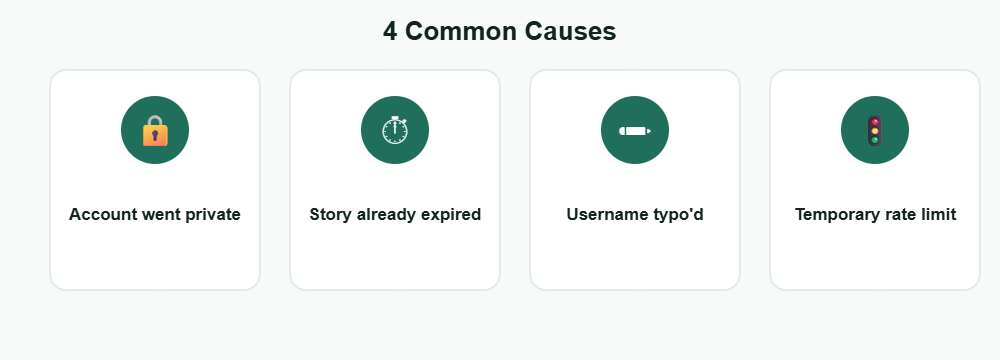
Before trying fixes, it helps to know the usual suspects. An Instagram story viewer not working almost always traces back to one of these: the account went private, the story already expired, the username or link was typo’d, or a temporary Instagram-side rate limit kicked in after too many rapid requests. If the names vanish after a while, read why the viewer list disappeared.
7 fixes, in order
Re-check the username spelling
A single typo’d character is the single most common reason an Instagram story viewer not working turns out to be user error, not a broken tool. If part of the list looks dimmed, here is why it gets greyed out.
Confirm the account is public
Viewer tools can only pull stories from public accounts. A private account will always fail, regardless of which tool you use.
Check whether the story already expired
Stories disappear after 24 hours. If the story was posted more than a day ago, no viewer tool can retrieve it. If a problem persists after these steps, check Instagram’s Help Center for known issues with the app itself.
Refresh the page and retry
A stuck request or a stale cached page causes a large share of “not loading” reports. A hard refresh clears most of these.
Wait out a rate limit
Checking too many profiles too quickly can trigger a short, temporary block. Waiting 10–15 minutes usually clears it.
Try a different browser or clear cache
Browser extensions and stale cached scripts can silently break a page. An incognito/private window rules this out fast.
Check your own connection
A weak or restricted network (some office or school Wi-Fi) can block the underlying requests entirely.
What you can and can’t fix yourself
You can
- Fix typo’d usernames, expired links, and stale cache instantly
- Wait out a temporary rate limit with no other action needed
- Rule out browser or network issues with an incognito window
- Confirm public vs. private status directly in the Instagram app
You can’t
- View a private account’s stories without following it and being approved
- Retrieve a story that has already expired past 24 hours
- Force Instagram to lift a rate limit faster than it resets on its own
Instagram story viewer not loading: loading vs. error
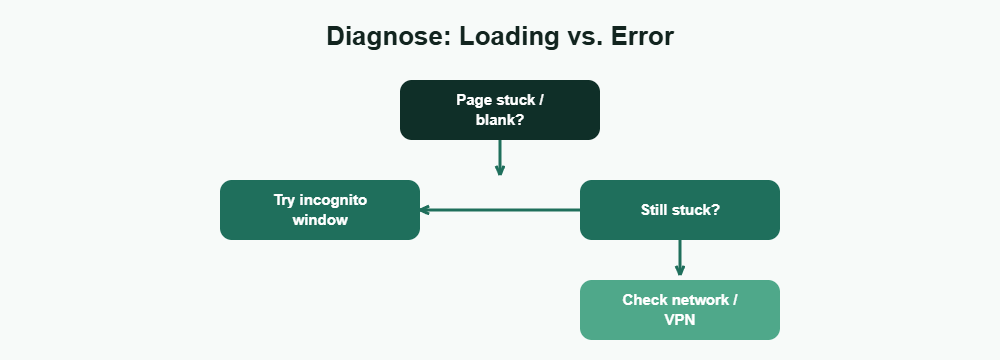
A page that shows an error message has already told you something specific. An Instagram story viewer not loading, by contrast, usually means the request never completed at all — a stuck connection, a blocked script, or a slow network, rather than Instagram actively rejecting the request. When your own posts do not reach people, see why stories are not showing to followers.
Can’t view an Instagram story inside Instagram itself?
Sometimes the problem is not a viewer tool at all, and you simply can’t view an Instagram story in the app. The usual reasons are that the story passed its 24-hour limit, the account is private and you do not follow it, the owner hid the story from you or shared it with Close Friends only, or the app needs an update or a restart. If the story ring is missing, there may be nothing to fix: the person may not have posted anything recently.
Start by updating the app and reopening the profile. To work out which case you are in, see our guides on stories not showing to followers and Close Friends stories.
Frequently Asked Questions
Why is my Instagram story viewer not working all of a sudden?
The most common sudden cause is a temporary rate limit after checking several accounts quickly, or the target account switching to private. Both resolve on their own or with the fixes above.
Is it normal for a story viewer to stop working temporarily?
Yes. Rate limits and cache issues are common and temporary — an Instagram story viewer not working for a few minutes usually isn’t a sign anything is permanently broken.
Can a VPN cause a story viewer to stop working?
Sometimes. Certain VPN exit locations get flagged more often for rate limiting, so switching servers or turning the VPN off can help.
Why does the viewer show an error for a public account?
Double-check the username spelling first — that accounts for most “public account won’t load” reports. After that, try refreshing or waiting a few minutes for a possible rate limit.
Does clearing cookies help fix a story viewer?
It can. Stale cookies or cached scripts occasionally interfere with how a page loads content, and clearing them forces a clean reload.
Is an Instagram story viewer not loading the same as it being broken?
Usually not. A loading issue is almost always local to your browser or network, not the tool itself — most cases resolve with a hard refresh or a different browser.
Can an ad blocker cause this issue?
Yes, this is one of the most common causes. Ad blockers and privacy extensions sometimes block the exact requests a story viewer needs to load content.
Should I keep retrying if the page won’t load?
Give it 10–15 seconds first. Repeated immediate retries can queue up duplicate requests and make an already slow load even slower.
Does mobile data vs. Wi-Fi make a difference?
It can. If one connection type consistently fails to load the page while the other works, the issue is your network, not the viewer tool.
Why can’t I view an Instagram story?
The story may have expired after 24 hours, the account may be private, the owner may have hidden it from you or limited it to Close Friends, or the app may need an update. Update Instagram, reopen the profile, and check whether the account is public.
Want to try a story viewer that just works?