Instagram Story Viewer Chrome Extension — Safe to Install?
Short answer: most instagram story viewer chrome extension listings ask for permissions far beyond what viewing a public story actually needs. A browser-based tool like InstaPVStory does the same job without installing anything at all.
On This Page
Instagram story viewer chrome extension: the short answer
Installing an instagram story viewer chrome extension usually means granting it access to read and change data on every site you visit, not just Instagram — a much bigger ask than a simple story-viewing feature should require. That permission scope is the main reason to think twice before installing one, especially for a task that a plain web page can handle just as well. A browser tab that only runs when you open it carries far less ongoing risk than software sitting in your browser at all times, quietly able to see whatever page you load next. Check an extension’s permissions and reviews in the Chrome Web Store before installing anything.
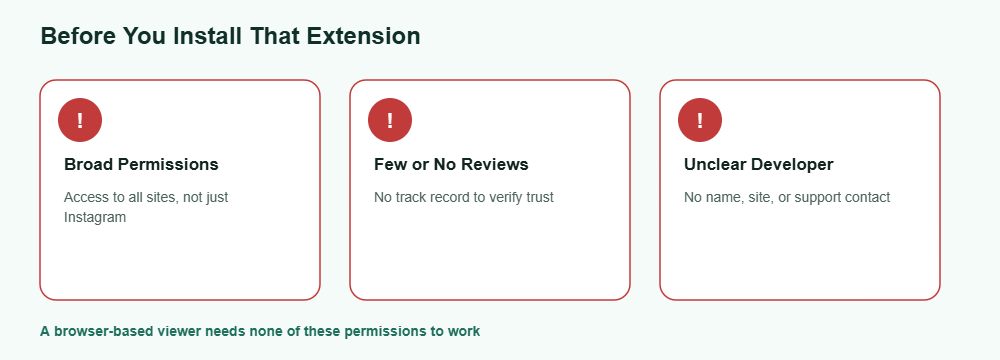
What to watch for
Broad permission requests
An extension asking to “read and change all your data on all websites” can do far more than just show you a story.
Few reviews or a new listing
Extensions with almost no reviews or a very recent publish date are harder to trust, since there’s little track record to check before you grant it access. Worried about being noticed? Find out if someone can see you viewed their story.
Unclear developer information
A listing with no real developer name, website, or support contact is a common pattern in low-quality or abandoned extensions that no one is maintaining. The sequence of names is explained in our story viewer order guide.
None of these red flags mean every instagram story viewer chrome extension is unsafe, but each one is a reason to slow down and check the listing carefully before granting broad browser access for what should be a narrow task. Taking two minutes to check reviews and permissions before installing can save you from a much bigger headache later. Most people start with a free Instagram story viewer before they consider anything paid.
A safer alternative
Here’s how a browser-based viewer compares to installing an extension for the same task.
Browser-based viewer
- No install or permissions needed
- Nothing runs when you’re not using it
- Works the same across any browser
Chrome extension
- Requires broad site permissions
- Keeps running in the background
- Only works in that specific browser
For most people, a web-based instagram story viewer chrome extension alternative covers the same need — viewing a public story — without asking for standing access to everything else you browse. It also means one less piece of software to remember to update or eventually uninstall.
Frequently Asked Questions
Is every instagram story viewer chrome extension unsafe?
Not necessarily, but many request broader permissions than the task needs, so it’s worth checking reviews and permissions carefully before installing anything new.
What permissions should worry me on an extension listing?
Anything requesting access to “read and change all your data on all websites” for a simple viewing feature is worth questioning.
Do I need to install anything to view public Instagram stories?
No, a browser-based tool can load public stories directly in a web page without any extension or download.
How can I check if an extension is trustworthy?
Look at the number and quality of reviews, how long it’s been listed, and whether the developer provides real contact information.
Can I remove an extension after installing it if I change my mind?
Yes, but removing it doesn’t undo any data it may have already accessed while it was active, so it’s better to avoid risky ones from the start rather than uninstalling later.
Want to skip the extension entirely?