Instagram Post Downloader — Save Photos in HD, No Login
An instagram post downloader saves a public photo, carousel, or caption straight to your device at full resolution — no login, no watermark, and no app install. Here’s exactly how it works, built on the same anonymous approach as InstaPVStory.
How does an instagram post downloader work: the short answer
An instagram post downloader reads the public page behind a post’s link and pulls the original image file at its full resolution, the same one Instagram serves to any browser — it never needs your password because it only touches what’s already publicly visible. For short videos, an Instagram Reels downloader saves them without a watermark.
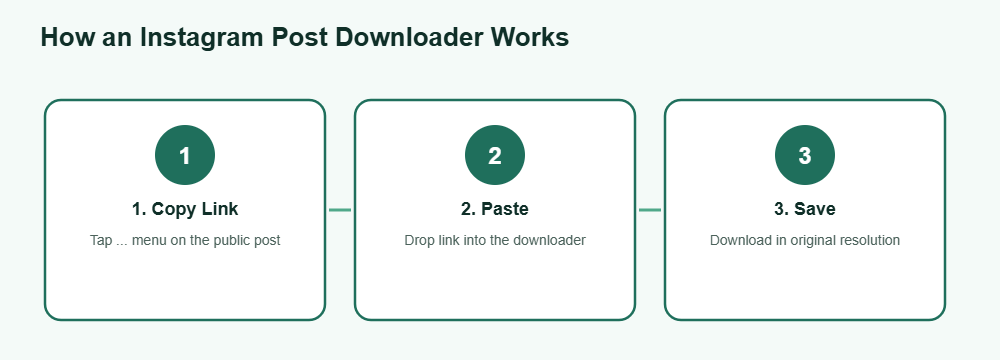
How to download a post
Copy the post link
Open the public photo or carousel post, tap the three-dot menu, and choose “Copy Link” to grab its URL.
Paste it into the downloader
Drop the link into an instagram post downloader tool. For a carousel, it will typically list every image in the set separately.
Save the image
Tap download to store the photo to your camera roll or downloads folder in its original resolution, with no watermark added.
That covers the whole process for a working instagram post downloader — no extension, no account link-up, and nothing beyond a normal browser tab. Carousel posts just repeat the save step once per image in the set, so a ten-photo post takes only slightly longer than a single one. The whole flow typically finishes in a few seconds on a normal connection, and works the same way on a phone browser as it does on a desktop one. Only save content you own or have permission to reuse, as explained by the U.S. Copyright Office.
What works vs. what doesn’t
Not everything on Instagram can be pulled by an instagram post downloader — here’s the honest breakdown of what’s fair game and what isn’t, so there’s no confusion going in. Compare all story download methods in one place.
Works
- Public feed photos and carousel posts
- Full captions alongside the saved image
- Public business or creator account posts
Doesn’t work
- Photos on private accounts you don’t follow
- Archived posts hidden from the public grid
- Posts the owner has since deleted
As with any downloader, saving a public photo for personal use is one thing, but reposting someone else’s work as your own is a separate copyright question worth thinking through before you share it further. Crediting the original creator or sending a quick message to ask permission is the safer path, and most creators are happy to be tagged rather than left uncredited. That small courtesy also tends to build goodwill for the next time you want to share their work. Most creators respond quickly to a friendly direct message, and it keeps everything on good terms. For a full ranking, see how the story viewers compared side by side.
Frequently Asked Questions
Does an instagram post downloader keep the original caption?
Yes, most tools display the full caption alongside the saved image so you can copy it separately if needed.
Can I download every photo in a carousel post at once?
A good instagram post downloader lists each image in a carousel individually, so you can save all of them or just the ones you want.
Do I need to log in to use it?
No. A legitimate downloader only needs the public post link — it never asks for your Instagram username or password.
Will the downloaded photo have a watermark?
No, a proper instagram post downloader pulls the exact file Instagram serves in the browser, with no watermark added on top.
Can I download photos from a private account?
No. If you can’t view the photo without logging in and following the account, no downloader tool can pull it either — the content isn’t public.
Want to save a post right now?