Instagram Reels Downloader — No Watermark, No App
Need an Instagram Reels downloader? Instagram doesn’t give you a native save button for anyone else’s Reel, so you need a separate tool to keep a copy in its original quality. This guide covers exactly how that works, plus how it compares to our anonymous Instagram story viewer for content that isn’t a Reel.
On This Page
Instagram Reels downloader: how to save any public Reel
For a Reel on a public account, the process is the same regardless of which downloader site you use: paste the Reel’s link, let the tool pull the original video file, then save it straight to your device. There’s no Instagram-native way to do this for content that isn’t your own, which is exactly the gap an Instagram Reels downloader fills. Need a larger avatar? Use a profile picture downloader to view it in HD.
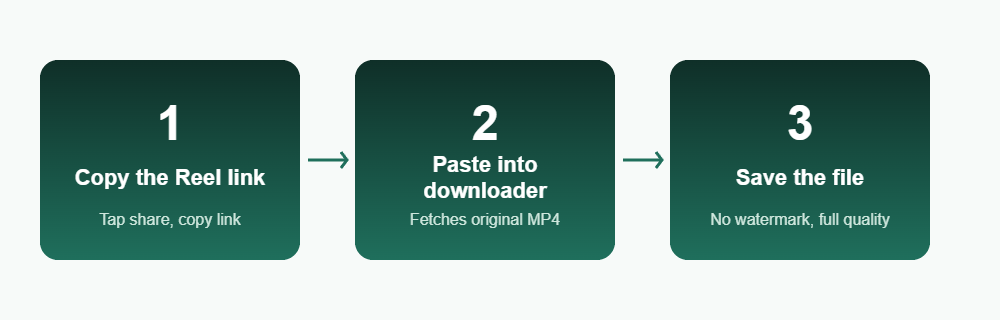
Copy the Reel link
Open the Reel in the Instagram app or on the web, tap the share icon, and copy the link.
Paste it into the downloader
The tool fetches the Reel’s original video file directly from the link, not a screen recording.
Save the MP4
Download the file to your camera roll or downloads folder in its original resolution.
Why “no watermark” actually matters
Screen-recording a Reel is the obvious workaround, but it bakes in the on-screen UI, the like/comment icons, and often a visible drop in quality. A proper Instagram Reels downloader pulls the source video file itself, so there’s no watermark, no overlay, and no re-compression from recording your own screen. The story viewer order algorithm explains why names are sorted the way they are. Only save content you own or have permission to reuse, as explained by the U.S. Copyright Office.
This distinction matters most if you’re saving a Reel to repost with credit, archive for reference, or just keep for yourself — a screen recording is always a worse copy than what the downloader gives you. To keep clips, use an Instagram video downloader.
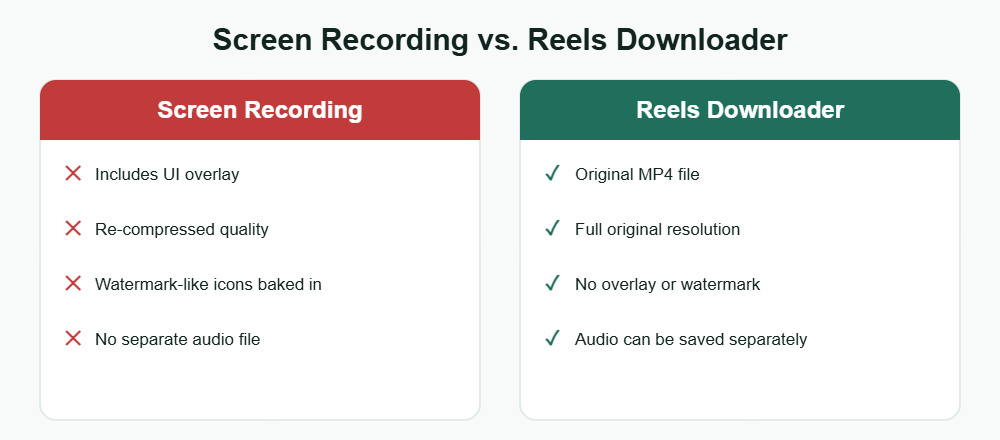
What you can and can’t do
You can
- Save any Reel from a public account in its original MP4 quality
- Skip the watermark and UI overlay that screen recording adds
- Do this from a browser on any device, with no app install
- Save the Reel’s audio separately if the tool supports it
You can’t
- Download a Reel from a private account you don’t follow
- Recover a Reel the creator has already deleted
- Bulk-download an entire profile’s Reels in one action on most tools
Quality, formats, and audio
Most Instagram Reels downloader tools save the video as a standard MP4 file, matching the resolution the creator originally uploaded — usually 1080p vertical. If you only want the sound, our related guide on Reels audio extraction covers pulling just the audio track instead of the full video.
If what you’re actually after is a Story rather than a Reel, the process is different — Stories expire in 24 hours and use a separate save flow, which our Instagram Story Downloader guide covers in detail.
Frequently Asked Questions
Is an Instagram Reels downloader safe to use?
A safe one never asks for your Instagram password — it only needs the public link to the Reel. Treat any tool that requests a login as a red flag.
Does the Reel’s creator get notified when I download it?
No. Downloading a public Reel is the same as watching it — Instagram doesn’t send a notification when someone saves or views public content.
Why does a screen recording look worse than a downloaded Reel?
A screen recording captures your device’s display, including UI elements and any compression your screen recorder applies. An Instagram Reels downloader instead pulls the original video file, so there’s no quality loss from recording.
Can I download a Reel from a private account?
Only if you’re an approved follower and can view it in the app — even then, most downloader tools work off a public link, so private Reels generally aren’t supported.
Is it legal to download someone else’s Reel?
Saving a public Reel for personal viewing is generally fine, but reposting it without credit or permission can raise copyright issues, since the creator still owns the content.
Want to browse stories anonymously too?